Traditional RAG systems are very effective when the answer can be found in one or a few relevant text chunks. However, they often struggle when a question requires connecting multiple pieces of information, following relationships across entities, or reasoning over data that is scattered across many documents.
GraphRAG addresses this limitation by adding a knowledge graph to the retrieval process. Instead of retrieving isolated text chunks only, the system can also retrieve entities, relationships, and graph neighborhoods. This gives the LLM a more structured view of the data and enables more reliable multi-hop reasoning.
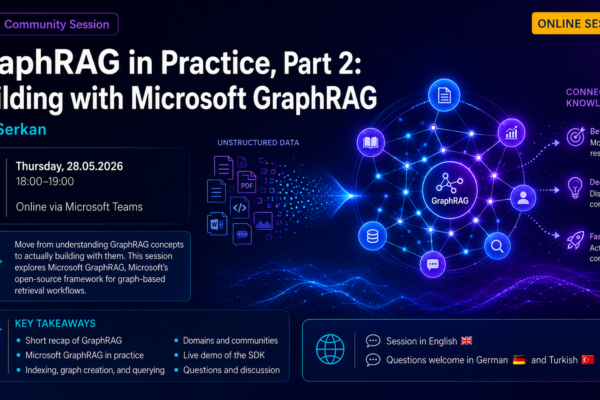
In this blog post, I introduce GraphRAG through a hands-on demo project. The project extracts entities and relationships from 51 scientist Wikipedia articles, stores them in Neo4j, combines them with vector search in Qdrant, and compares vector-only, graph-only, and hybrid retrieval approaches.
Evolution of LLM systems
Over the last few years, common LLM application patterns have evolved from simple chat interfaces to RAG-based systems and, increasingly, to agentic architectures. These patterns do not replace each other completely; in practice, many production systems combine them.
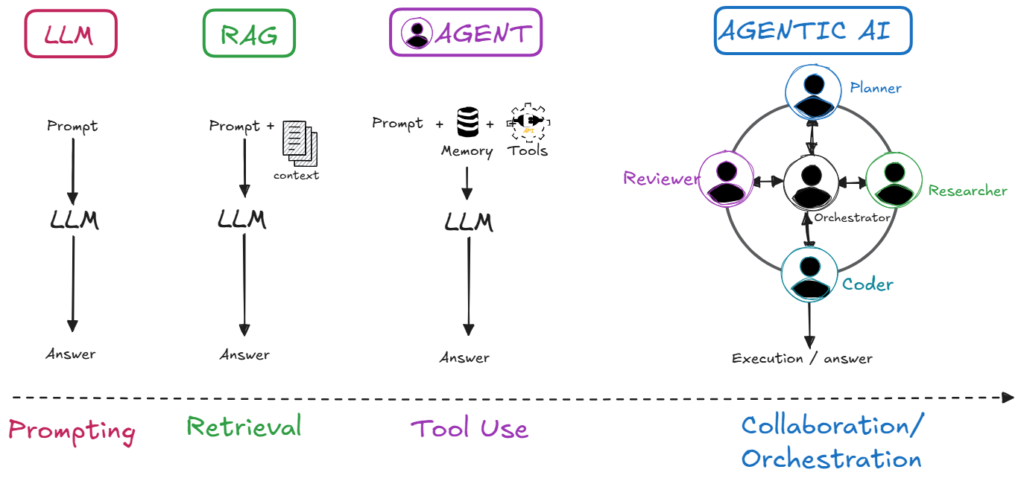
Phase 1 – Plain LLM chat
The first wave of LLM usage was simple: you opened a chat UI, typed a prompt, got an answer. This was already powerful for brainstorming, summarization, rewriting, and explaining general topics.
However, all of these answers were limited to whatever the model had seen during training. The model was not connected to your documents or company knowledge, had no access to live systems or tools, and had no reliable long-term memory.
So answers could sound convincing but still be wrong, hallucinated, outdated, or misaligned with internal policies and data.
This limitation is what motivated RAG: instead of relying only on what the model “remembers” from training, we inject our own knowledge at runtime.
Phase 2 – Retrieval‑ Augmented Generation (RAG)
Retrieval‑Augmented Generation (RAG) was the first big step beyond pure chat. Instead of answering only from training data, the system first retrieves relevant information from external knowledge sources—documents, PDFs, wikis, tickets, etc. —and then injects that content into the prompt before calling the model.
The high‑level process looks like this:
- Take the user query first (prompt).
- Retrieve relevant data from your knowledge sources.
- Add the retrieved content as context to the given prompt.
- Let the LLM generate an answer grounded in that context.
This makes answers more accurate, auditable, and aligned with your own data, without constantly retraining the underlying model. RAG is now a core pattern in many production LLM applications.
Phase 3 – Agentic systems
Even with good retrieval, classic RAG pipelines are often single-shot: one query, one retrieval step, one generated answer. They usually do not plan across multiple steps, call several tools, or manage longer tasks by themselves.
Agentic systems extend this pattern. An agent still uses an LLM, but it can also access tools, APIs, data systems, memory, and state. Instead of answering a single question in one pass, an agent can break a task into sub-steps, decide which information to retrieve, call functions or APIs, and continue based on intermediate results.
In other words, the system moves from “Here is an answer based on retrieved context” to “I checked the relevant systems, used the right tools, and completed the task.”
In the rest of this post, we’ll focus on one key part of this evolution—RAG itself, and especially how graph‑based RAG (GraphRAG) extends it.
Why RAG became so important
Once teams started using LLMs seriously, they quickly hit a hard limitation: models only know what they saw during training. Every time documents, policies, product details, or project information changed, the model stayed frozen.
Retraining or fine‑tuning a large model to keep up with this change is:
- Slow – collecting data, running training jobs, and validating new checkpoints takes time.
- Expensive – it consumes significant compute and specialist effort.
- Inflexible – you can’t realistically retrain for every new wiki page, ticket, or incident report.
RAG became such an important step because it breaks this dependency on training data. Instead of encoding all knowledge inside the model, you:
- Keep your truth in your trusted data sources (wikis, PDFs, tickets, databases).
- Retrieve relevant pieces at query time and feed them into the prompt.
- Let the model focus on reasoning and generation, not memorizing every fact.
That means:
- Updating content or indexes is enough to update what the model “knows.”
- You can ground answers in current, verifiable sources.
- You can use the same base model across multiple domains by changing the retrieval layer, without fine-tuning the model for each specific domain.
With that motivation in place, it makes sense to show the different types of RAG—from naive vector search to graph‑based approaches like GraphRAG.
The RAG spectrum: from basic to graph‑based
RAG is not a single fixed architecture, but rather a whole family of related techniques that form a spectrum of approaches. The diagram below highlights the common points on that spectrum:
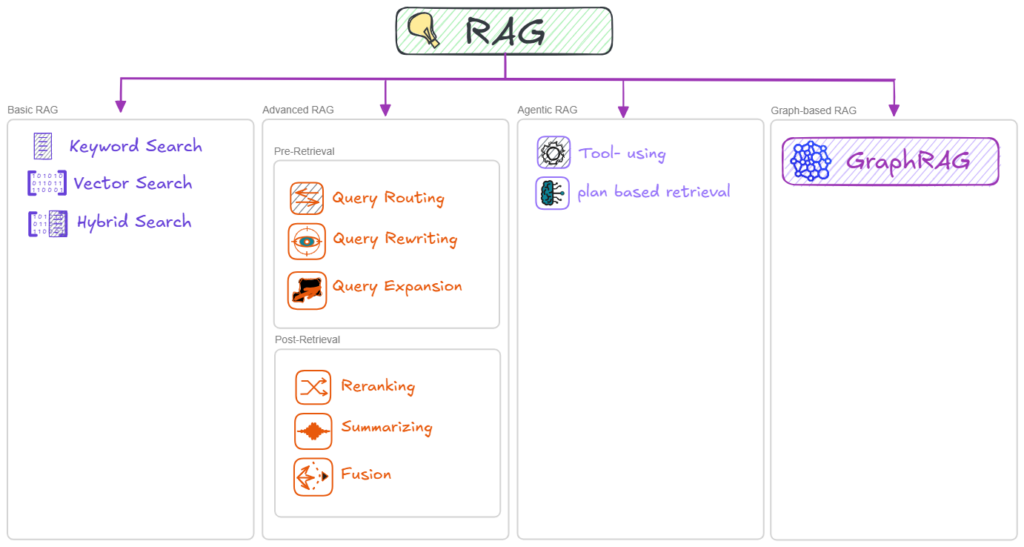
Basic (or Naive) RAG: In the basic (or naive) RAG setup, retrieval is usually done with keyword search, vector search, or a hybrid of the two. The system uses one of these retrievers to fetch the top‑k most relevant chunks and then simply stuffs those chunks into the prompt. This works well for straightforward Q&A, but it starts to struggle as questions require deeper reasoning, long contexts, or information that is scattered across multiple places.
Advanced Retrieval RAG: Advanced Retrieval RAG focuses on improving retrieval quality on top of this foundation. It extends basic RAG with techniques such as query rewriting, generating multiple search queries, re‑ranking candidates, hierarchical retrieval, and better chunking strategies so that the system can return more accurate, complete, and explainable context.
Agentic RAG: In Agentic RAG, an agent decides how to search, which tools or data sources to call, and when to refine or repeat retrieval. Retrieval is no longer a single step but becomes part of a multi‑step reasoning and action pipeline in which the system can plan, call APIs, and adapt its strategy based on intermediate results.
Graph‑based RAG (GraphRAG): Graph‑based RAG, or GraphRAG, brings knowledge graphs into this picture. It uses graphs alongside text, retrieving not only documents but also entities and their relationships so the model can perform structured, multi‑hop reasoning as it traverses the graph.
With that foundation in place, we can now focus on the main topic: GraphRAG.
What is GraphRAG?
GraphRAG is a RAG pattern where the system retrieves not only text chunks, but also structured knowledge from a graph. In that graph, entities such as people, systems, documents, products, or concepts are represented as nodes, and their relationships are represented as edges.
Instead of relying only on semantic similarity between the user question and text chunks, GraphRAG can follow relationships such as “depends on”, “created by”, “owned by”, “located in”, or “caused by”. This makes it especially useful for questions that require multi-hop reasoning across connected information.
To understand how this works, it helps to look at a simple knowledge graph example.
Consider a small graph where “Nikola Tesla” appears as one node and “Electrical Engineering” appears as another node. Between them is a relationship labeled “worked in”.

In graph terms, “Nikola Tesla” and “Electrical Engineering” are entities, or nodes. The phrase “worked in” is the relationship, or edge, connecting them. Together, they form a triple:
Nikola Tesla → worked in → Electrical Engineering
The Tesla node can also have properties such as birth year, nationality, and profession. By transforming text into entities, relationships, triples, and attributes, we turn unstructured information into structured knowledge that is easier to traverse and reason over.
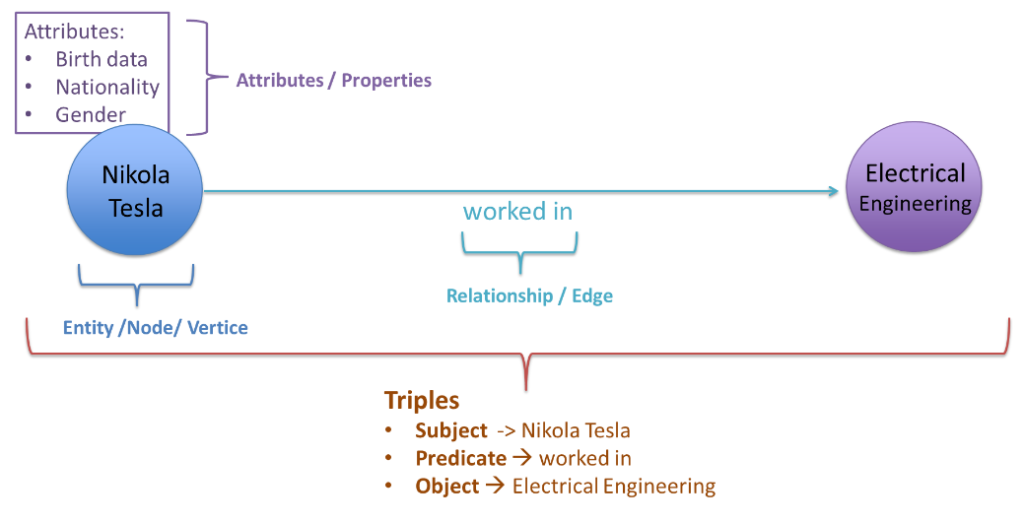
This structure is what enables multi‑hop queries.
A multi-hop query is a question where the answer cannot be found in a single document, chunk, or relationship. Instead, the system has to combine several connected pieces of information.
In a knowledge graph, this means starting from one entity, following a relationship to another entity, and then continuing along additional relationships. Each step from one node to another is called a “hop”.
Our Tesla example is a simple one-hop path:
Nikola Tesla → worked in → Electrical Engineering.
A more complex question might be “Which inventions are related to people who worked in Electrical Engineering?”
To answer this, the system first moves from the field to the people associated with it:
- Electrical Engineering → associated with → Nikola Tesla
- Electrical Engineering → associated with → Thomas Edison
Then it follows another relationship from each person to their inventions:
- Nikola Tesla → invented → Tesla Coil
- Thomas Edison → invented → Light Bulb.
The system therefore has to navigate from a domain to people, and then from people to inventions. That is a two-hop reasoning path.
Hands‑on GraphRAG Demo with 51 Scientist Articles
To make the concepts in this article reproducible, I’ve published the full demo as an open‑source project on GitHub here. It walks through a complete GraphRAG pipeline that combines a Neo4j knowledge graph with Qdrant vector search over 51 Wikipedia scientist articles.
The project compares three retrieval strategies side‑by‑side:
| Mode | Retrieval | Best for |
|---|---|---|
| Vector only | Qdrant semantic similarity | “Who worked on quantum mechanics?” |
| Graph only | Neo4j multi‑hop traversal | “How are Marie Curie and Niels Bohr connected?” |
| Hybrid | Vector + graph combined | Rich, contextually complete answers |
This helps illustrate where each approach works best: vector‑only for broad topical questions, graph‑only for pure relationship queries, and hybrid when you want both structure and supporting text.
Architecture at a glance
In this project I wired the components together in a straightforward GraphRAG pipeline.
First, a small script pulls 51 scientist articles from Wikipedia via the MediaWiki API and stores them as plain‑text files.
Next, Azure OpenAI GPT‑4o processes each article and produces JSON with entities and typed relationships, which are then loaded into Neo4j so that entities become nodes and relationships become edges in the knowledge graph.
In parallel, the raw article text is chunked, embedded with text-embedding-3-small (1536 dimensions), and written into Qdrant along with metadata.
At query time, the notebooks extract entities from the user question, retrieve relevant passages from Qdrant, walk the corresponding neighborhood in Neo4j, and finally ask the LLM to generate three answers side‑by‑side: vector‑only, graph‑only, and hybrid.
The README also contains a small ASCII diagram that shows how these pieces map to the local Docker/WSL setup for Neo4j and Qdrant, plus the Azure OpenAI deployments.
Notebooks and project structure
The repo is organized to be easy to follow even if you’re new to GraphRAG. The core logic lives in five Jupyter notebooks under src/notebooks/.
1_get_data_from_wikipedia.ipynb– Fetches 51 Wikipedia articles as text.2_extractEntities.ipynb– Uses GPT‑4o to extract entities and relationships into JSON.3_import_triples_to_neo4j.ipynb– Imports those triples into Neo4j as a knowledge graph.4_create_vectors.ipynb– Chunks, embeds, and pushes vectors into Qdrant.5_execute_rag.ipynb– Executes queries and compares vector‑only, graph‑only, and hybrid modes.
Under src/prompts/ you find thefindentites.md prompt file, which documents the extraction instructions used with GPT-4o.
Getting started with demo project
If you want to play with this GraphRAG setup yourself, you can run everything locally using Neo4j, Qdrant, and Azure OpenAI. The project is intentionally small so you can spin it up on a laptop and experiment, similar in spirit to other Neo4j–Qdrant GraphRAG examples.
First, clone the repository and set up a virtual environment:
git clone https://github.com/charisal/GraphRAG-Demo.git
cd GraphRAG-Demo

python -m venv .venv
# Windows
.venv\Scripts\activate
# macOS / Linux
source .venv/bin/activate

pip install -r requirements.txt
Next, start Neo4j and Qdrant. You can either use Neo4j Desktop or run both services in Docker:
docker run -p 6333:6333 qdrant/qdrant

docker run \
  --name neo4j \
  -p 7474:7474 -p 7687:7687 \
  -e NEO4J_AUTH=neo4j/your_password \
  neo4j:5
Then create a .env file based on the template and point it at your local services and Azure OpenAI deployments:
cp .env.example .env
# Edit .env and fill in:
# - Neo4j URI, user, password
# - Qdrant URL and collection name
# - Azure OpenAI endpoint, key, and model names
With that in place, you can walk through the pipeline step by step by running the notebooks in src/notebooks/:
1_get_data_from_wikipedia.ipynb2_extractEntities.ipynb3_import_triples_to_neo4j.ipynb4_create_vectors.ipynb5_execute_rag.ipynb
The final notebook runs several example questions and shows the vector-only, graph-only, and hybrid answers side by side, so you can compare where each approach works best.
Real‑world applications of GraphRAG
In practice, GraphRAG is most useful whenever you care less about single documents and more about how things are connected.
Some typical areas are:
Enterprise knowledge search:
Instead of just “search all documents for this keyword,” you can ask:Which documents, teams, and systems are related to this topic?
GraphRAG can connect architecture diagrams, service ownership, incident tickets, and documentation into a single knowledge network.
Fraud detection:
Fraud is rarely visible in a single transaction. You want to know:Which accounts, transactions, people, or companies are suspiciously connected?
GraphRAG helps uncover rings of accounts, shared devices, common merchants, or repeated patterns across multiple channels.
Cybersecurity:
Security teams need to understand how assets, vulnerabilities, users, and potential attack paths connect. Questions likeWhich assets, vulnerabilities, users, and attack paths are connected in this environment?
become graph queries that GraphRAG can translate into natural‑language explanations.
Product knowledge and recommendations:
You can link products, features, customers, feedback, issues, and documentation:Which products, features, customers, and issues are related to this problem?
The system can then surface recommendations or impact analysis that go beyond simple “customers who bought X also bought Y”.
Impact analysis:
In complex IT landscapes, you often need to ask:
If this system fails, which business processes are affected?
GraphRAG can trace dependencies across services, data flows, teams, and SLAs to produce an explainable impact map.
A useful analogy is modern search engines. They do not only match keywords; they also maintain structured knowledge about entities and relationships. GraphRAG brings a similar principle into private or domain-specific data.
Advantages of GraphRAG over basic RAG
GraphRAG adds overhead, but it also brings important benefits over plain vector RAG.
- Better multi‑hop reasoning: It can follow structured relationships instead of hoping similar text appears in the same chunk.
- More precise retrieval:You can explicitly constrain retrieval to certain entity types or relationship patterns, rather than relying only on embedding similarity.
- Explainability: Answers can be backed by graph paths (“A → depends on → B → owned by → Team X”), which is easier to interpret and debug.
- Richer context construction: Instead of stuffing independent chunks into the prompt, you can assemble coherent neighborhoods around entities and provide the model with a structured view of the problem.
Challenges and trade‑offs of GraphRAG
GraphRAG is powerful, but it also comes with several non‑trivial challenges:
- Building the knowledge graph:To build a graph, you must extract entities, relationships, and attributes from often messy documents: PDFs, tickets, logs, emails, legacy systems. The quality of the graph strongly depends on the quality and consistency of the source data.
- Entity and relationship extraction:The system must correctly identify important entities and how they are connected, resolving ambiguities such as whether two names refer to the same person or system. Errors at this stage become wrong edges in the graph, which can directly lead to wrong answers.
- Graph maintenance:Business knowledge changes over time: systems, teams, documents, and processes evolve.
If the graph is not updated regularly, it will drift away from reality and start producing outdated or misleading answers. - Architectural complexity: GraphRAG is usually more complex than basic RAG.With basic RAG, you mostly deal with chunks, embeddings, and vector search. With GraphRAG, you need a graph model, a graph database, entity and relationship extraction pipelines, and graph‑aware retrieval logic.That extra complexity brings more moving parts to design, operate, and monitor.
- Retrieval quality: The system must decide which nodes and relationships are relevant for each question. If it retrieves too little, answers may be incomplete; if it retrieves too much, answers can become noisy or confusing. Designing graph traversal, neighborhood selection, and hybrid graph+vector strategies is still an active area of research.
- Cost and performance: Building and searching a graph can require more processing time and infrastructure than a simple vector index, especially if you rely heavily on LLM calls during graph construction or complex multi‑hop traversal at query time.For large enterprise datasets, this can become expensive if it is not engineered carefully.
- Evaluation: Evaluating GraphRAG is harder than evaluating a single‑step RAG system. You need to check not only whether the final answer sounds good, but also whether the retrieved entities, relationships, and sources are correct.
In short, GraphRAG can improve retrieval quality, reasoning, and explainability when relationships matter. But it is not free. It requires a reliable graph extraction pipeline, careful schema design, regular maintenance, and proper evaluation. For simple question-answering over a small document set, classic RAG may be the better engineering choice.
When does GraphRAG make sense?
Putting all of this together, GraphRAG tends to shine in scenarios like:
- Complex domain knowledge where relationships matter: finance, healthcare, legal, cybersecurity, supply chain, IT architecture.
- Multi‑hop reasoning over internal data, e.g. impact analysis, root‑cause or blast‑radius analysis.
- Fraud and anomaly detection over accounts, devices, merchants, and transactions.
- Enterprise knowledge search and governance where you need explainable, traceable answers.
For small, straightforward FAQ‑style systems, simple RAG may still be enough. GraphRAG starts to pay off as your questions, domains, and reasoning chains become more complex.
Closing thoughts
RAG solved an important problem: it freed us from the limitations of static LLM training by connecting models to our own knowledge sources at runtime. GraphRAG goes a step further by connecting models to structured knowledge in the form of graphs, enabling multi‑hop reasoning and more explainable answers in complex domains.
As LLM systems mature, I expect many serious applications to blend advanced RAG, GraphRAG, and agentic patterns. The key is to pick the right level of sophistication for your use case—and to invest in the knowledge structures that your AI will rely on.