As organizations increasingly balance performance, cost, and data governance in AI systems, local AI inference has become a strategic capability rather than a niche requirement. Microsoft AI Foundry Local addresses this need by enabling developers to run modern AI models directly on local hardware—without sacrificing cloud-compatible workflows.
This post walks through what Foundry Local is, why you might deploy AI models locally, how the architecture works, and how to get started—from installation to model selection—ending with a practical demo workflow.
What is Foundry Local?
Foundry Local is Microsoft’s on-device AI inference solution that allows developers to run AI models locally using a familiar, cloud-compatible developer experience.
At its core, Foundry Local enables:
- Running AI models entirely on local machines
- Interacting with those models via a CLI, SDKs, or REST APIs
- Maintaining OpenAI-compatible APIs, making it easy to switch between cloud and local execution
This design allows developers to prototype, test, and even deploy AI workloads locally while preserving portability to Azure AI Foundry when needed.
Key Capabilities
- On-device inference: Reduced latency, improved responsiveness, and stronger data control.
- Model flexibility: Use curated preset models or bring your own.
- Cost efficiency: Leverage existing hardware and avoid recurring cloud inference costs.
- Seamless integration: Compatible with SDKs, OpenAI-style APIs, and command-line workflows.
Ideal Use Cases
- Applications handling sensitive or regulated data
- Offline or bandwidth-constrained environments
- Low-latency, real-time AI scenarios
- Cost-optimized inference pipelines
- Local experimentation before cloud deployment
Why Deploy AI Models Locally?
While cloud AI platforms offer scalability and convenience, local deployment provides tangible advantages in specific scenarios.
- Data Privacy and Sovereignty: Running inference locally ensures sensitive data never leaves the device, which is critical for regulated industries such as healthcare, finance, and government.
- Reduced Latency: Eliminating round trips to the cloud enables real-time responsiveness—especially important for interactive applications and edge workloads.
- Cost Control: Local inference avoids usage-based cloud billing and makes better use of existing CPU, GPU, or NPU resources.
- Offline Operation: Once models are downloaded and cached, Foundry Local supports fully offline execution.
- Developer Velocity: Developers can iterate, test, and debug models locally before promoting workloads to cloud environments.
Architecture Overview
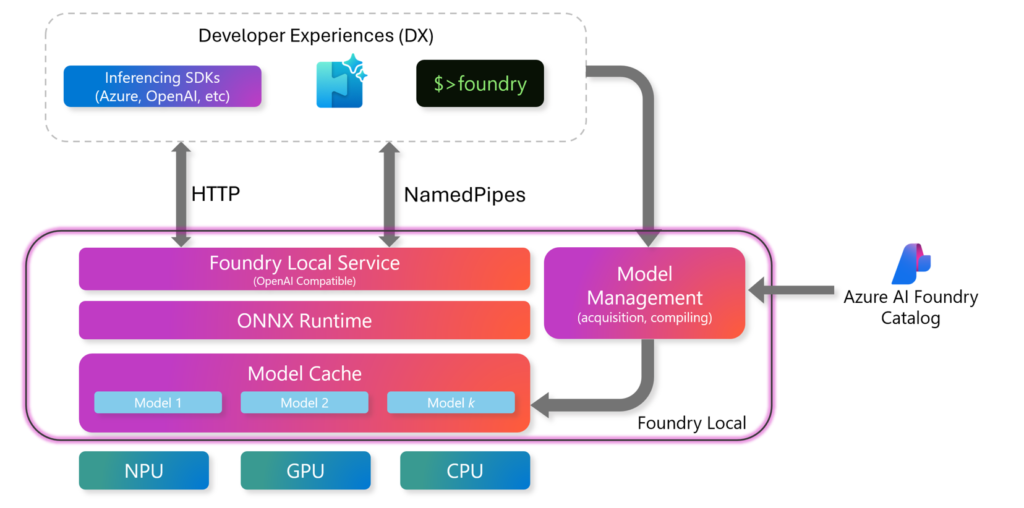
Foundry Local is designed with a clean separation between developer experience, runtime services, and hardware acceleration.
High-Level Components
Developer Experiences (DX)
- SDKs (Azure, OpenAI-compatible)
- REST APIs
- Foundry CLI
Foundry Local Runtime
- Foundry Local Service (OpenAI-compatible endpoint)
- ONNX Runtime for optimized inference
- Local Model Cache for downloaded models
Model Management
- Handles model acquisition and compilation
- Integrates with the Azure AI Foundry Catalog
Execution Providers
- CPU
- GPU
- NPU
Communication between components happens over HTTP or named pipes, depending on the interaction model. This architecture ensures both flexibility and performance across diverse hardware environments.
Installation and Setup
Prerequisites
Operating Systems
- Windows 10 (x64)
- Windows 11 (x64 / ARM)
- Windows Server 2025
- macOS
Hardware
- Minimum: 8 GB RAM, 3 GB free disk space
- Recommended: 16 GB RAM, 15 GB free disk space
Acceleration (Optional)
- NVIDIA GPUs (2000 series or newer)
- AMD GPUs (6000 series or newer)
- Intel iGPU / NPU
- Qualcomm Snapdragon X Elite
- Apple Silicon
An internet connection is required for initial model downloads. Cached models can run offline.
Installation Options
Quick CLI Installation (Windows)
winget install Microsoft.FoundryLocal
Manual Installation
Download the installer from the Foundry Local GitHub releases page.
Verify Installation
foundry --version
Run Your First Model via CLI
This command downloads the model (if not cached) and starts local inference immediately.
foundry model run deepseek-r1-7b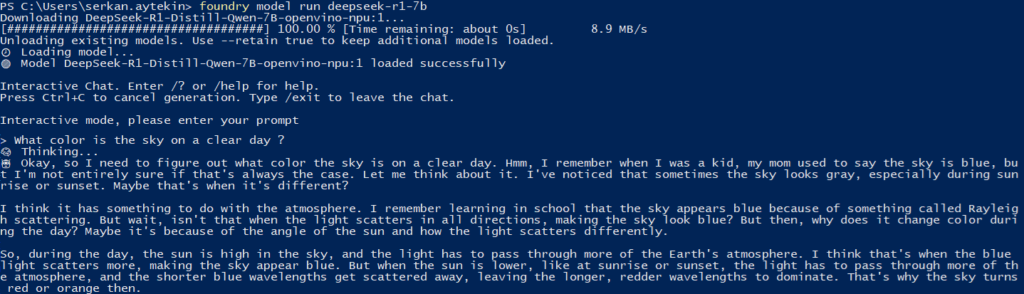
Using local AI Model in Code
Foundry Local exposes an OpenAI-compatible API, which means existing OpenAI-based applications can be adapted to local inference with minimal changes. The following Python example demonstrates how to connect to Foundry Local, select a locally cached model, and generate a streaming chat response.
Before running the example, make sure the required Python dependencies are installed:
pip install foundry-local-sdk
pip install openai
# First, the required libraries are imported.
# FoundryLocalManager is responsible for managing the local Foundry runtime,
# while the OpenAI client is used to interact with the model via a familiar API.
from foundry_local import FoundryLocalManager
import openai
# Next, a model alias is defined.
# Using an alias allows Foundry Local to automatically select the most suitable model variant for the user’s device.
alias="deepseek-r1-7b"
# A FoundryLocalManager instance is then created.
# This initializes the local Foundry service and exposes an endpoint that behaves like an OpenAI API.
manager = FoundryLocalManager()
# The OpenAI client is configured to point to the local Foundry endpoint.
# No API key is required for local usage, but the interface remains fully compatible with cloud-based OpenAI clients.
client = openai.OpenAI(
base_url=manager.endpoint,
api_key=manager.api_key # API key is not required for local usage
)
# To generate a response, the model ID is resolved from the alias and passed into a standard chat completion request.
# Streaming is enabled so tokens are returned incrementally, reducing perceived latency.
stream = client.chat.completions.create(
model=manager.get_model_info(alias).id,
messages=[{"role": "user", "content": "What color is the sky on a clear day ?"}],
stream=True
)
# Finally, the streaming output is processed token by token and printed as it arrives, producing a real-time response from the local model.
for chunk in stream:
if chunk.choices[0].delta.content is not None:
print(chunk.choices[0].delta.content, end="", flush=True)How to select the right model size
When running AI models locally, model size is primarily constrained by available memory, hardware acceleration, and the chosen execution provider. Unlike cloud environments, local inference must operate within fixed RAM and VRAM limits, which directly affect which models can be loaded and run efficiently.
Modern runtimes and optimization techniques make it possible to run powerful models on local devices, but practical upper limits still depend on the system. This topic is covered in detail in a separate post => see this post.
Final Thoughts
Microsoft AI Foundry Local brings the power of modern AI models closer to where your data and users live. By combining local inference, OpenAI-compatible APIs, and flexible hardware acceleration, it enables teams to build AI applications that are faster, more private, and more cost-effective.
At the architectural level, ONNX Runtime plays a key role in enabling this flexibility and performance.
The presence of ONNX Runtime in the Foundry Local stack highlights the importance of open, optimized inference standards for running AI efficiently across diverse hardware environments.
For readers who want a deeper understanding of this foundation, my separate blog post here provides an introduction to what ONNX is, how it works, and why it is so widely adopted for portable and production-ready machine learning.
Whether you are experimenting locally, deploying AI in constrained environments, or preparing workloads for the cloud, Foundry Local provides a consistent and developer-friendly foundation—making local AI a first-class citizen in your architecture.