I have been working with AI for a long time—long enough to remember when “prompting” was not a discipline, but simply something you did to make a model respond at all. Today, prompting has become a topic of its own: courses, cheat sheets, templates, and an ever-growing list of “must-follow” frameworks. Some of them are excellent. Many are repetitive. And most of them—if you strip away the branding—are fundamentally saying the same thing.
That is not a bad thing. In fact, it is a signal that the industry is converging on a set of shared principles: be clear about what you want, provide enough context, show examples, and refine until the output matches your intent. The names differ, but the mechanics do not.
In this post, I will briefly highlight a few common prompt frameworks so you can see the pattern for yourself. Then I will focus on the one I find particularly easy to apply in real work: Google’s 5 Steps Prompt Framework, also known as TCREI—Thoughtfully Create Really Excellent Inputs.
The Core Truth Behind Most Prompt Frameworks
When people ask me which framework is “best,” my honest answer is: the best framework is the one you will actually use consistently under real-world constraints. Most frameworks are trying to solve the same problem—turning fuzzy intent into precise instructions—because that is exactly where AI systems tend to break down.
In practice, strong prompting usually comes down to three recurring moves:
- Define the output clearly (what it is and what it should look like)
- Reduce ambiguity (audience, tone, constraints, scope)
- Create feedback loops (review, refine, rerun)
If a framework supports these moves, it will generally work.
A Few Prompt Frameworks You’ll Commonly See
Here are several prompt frameworks that appear frequently in courses, playbooks, and internal enablement materials. I am listing them not to rank them, but to show how closely they overlap in spirit.
Role–Task–Format (RTF)
A very practical structure for day-to-day use:
- Role: Who should the model be?
- Task: What should it do?
- Format: How should the output be structured?
This is essentially the “minimum viable prompt” for many workflows.
CLEAR
Often used in enterprise and consulting contexts, usually some variant of:
- Context
- Limitations / constraints
- Examples
- Audience
- Response format
It focuses heavily on controlling scope and aligning with stakeholders.
CO-STAR
Popular for marketing, writing, and comms:
- Context
- Objective
- Style
- Tone
- Audience
- Response
This is essentially a structured way to prevent generic outputs and tune voice.
APE (Action–Purpose–Expectation)
More lightweight and often used for quick prompting:
- Action: What should the model do?
- Purpose: Why do you need it?
- Expectation: What should “good” look like?
ReAct / Plan-then-Execute (advanced usage patterns)
More common in agentic or tool-using setups, where you want the model to reason stepwise, check assumptions, and act in stages. It is useful, but it’s a different category—more like orchestration than everyday prompting.
If you look closely, each framework is a remix of the same components: task clarity, context, examples, output control, and refinement.
Why I’m Focusing on Google’s 5 Steps Prompt Framework (TCREI)
The reason I like Google’s approach is that it is both simple and complete. It doesn’t only tell you what to put into a prompt—it also tells you how to work with the model after the first output.
Google frames it as:
Thoughtfully Create Really Excellent Inputs
Or in practical terms:
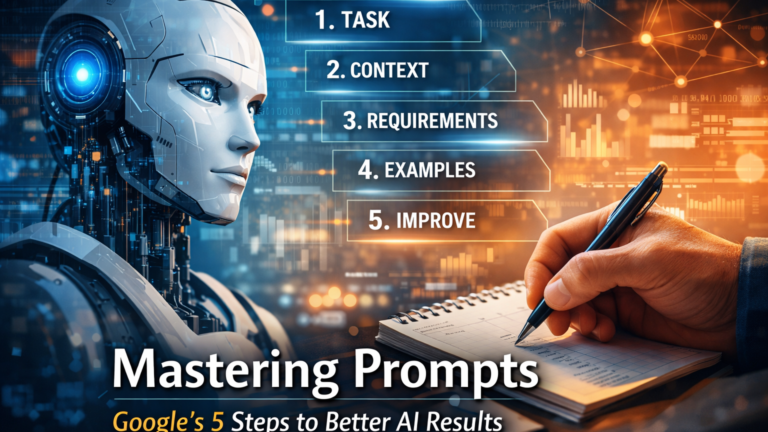
Task → Context → References → Evaluate → Iterate
This is the framework I will concentrate on in this blog post because it maps directly to how prompt work actually happens in production environments: you rarely get it perfect in one pass, so evaluation and iteration are not optional—they are part of the design.
The 5 Steps, Explained Like You’d Use Them at Work
1) Task: Say what you want, precisely
A task is not “help me with this.” A task is a clear instruction with a concrete outcome. In real workflows, I also strongly recommend specifying two things directly inside the task:
Persona: Who should the AI be (or who should it write for)?
Format: What structure should the output have?
This reduces ambiguity immediately. It is the difference between “draft something” and “draft an executive-ready one-page brief in clear business language.”
2) Context: Give the model the information it would otherwise guess
Most weak outputs are not “wrong”—they are simply based on the model guessing incorrectly about your situation. Context removes guesswork. It can include goals, constraints, stakeholder expectations, background, and what you already tried.
Context is often the longest part of a good prompt, and it is usually where the value is.
3) References: Show the model what good looks like
References anchor the response. This can be your own prior work, style samples, or comparable examples. When references are used well, the model’s output becomes more consistent and less generic.
A practical rule I follow is the one you mentioned in your notes: two to five references are usually enough. Too many can over-constrain the result and reduce creativity.
4) Evaluate: Treat the output as a draft, not as truth
Even experienced users can fall into the trap of trusting a confident-sounding output. Evaluation is where you check accuracy, relevance, bias, completeness, and alignment with the intended audience.
This is especially important when you are using AI for non-creative work: summaries, plans, recommendations, or anything that can influence decisions.
5) Iterate: Tighten the prompt until it works
Iteration is not “trial and error.” It is controlled refinement. When the output misses the mark, you adjust one of the earlier steps—task clarity, context, references, or constraints—and rerun.
In other words: the prompt is not a static instruction; it is a working artifact.
A Real Example: Turning the Framework into a Prompt
One example from the session mirrors a situation many teams encounter when introducing AI into existing workflows.
Imagine you want support preparing a short decision document for leadership. Instead of asking the AI to “summarize our AI options,” the prompt clearly defines the persona as a senior technology consultant advising an executive audience. The task is to create a concise, decision-ready briefing that compares two approaches for AI adoption: building in-house capabilities versus relying on external vendors.
The context explains that the organization is risk-averse, operates in a regulated environment, and needs to balance innovation with compliance and cost control. References include a previous internal strategy memo and a short summary of earlier pilot projects, giving the model a sense of tone, depth, and institutional language. The prompt also specifies the format: a one-page brief with a comparison table and a short recommendation section.
This prompt works well because it removes guesswork. The AI understands who it is speaking to, why the output exists, and what “useful” means in this situation. It follows the TCREI framework naturally—without unnecessary complexity—while still producing an output that is immediately usable in a real business setting.
In Closing
If you work with AI long enough, you start to see that prompting is less about “magic wording” and more about operational discipline. Different frameworks will come and go, but the fundamentals remain stable: clarity, context, examples, and iteration.
So yes—there are many frameworks. And yes—in their core, they mostly say the same thing.
The important decision is not which acronym you memorize. It is whether you adopt a structure you can apply repeatedly, especially when you are busy and need a reliable output fast.
For this blog series, I will stick with Google’s TCREI / 5 Steps Prompt Framework, because it is simple, practical, and aligned with how prompting works in real workflows.